
Court Tracking
How to Track Your Case in India: The Complete 2026 Guide
India's courts are fragmented across dozens of portals, each with its own login and search logic. This guide explains what identifiers you need, where case data lives, and how to set up automatic updates so you never check a portal manually again - across every court in the country.
Why Tracking a Case in India Is Harder Than It Should Be
India does not have a single court system. It has many, layered on top of each other, and each runs its own technology. The Supreme Court publishes case status on its own portal. The 25 High Courts each operate separate systems with different interfaces and update frequencies. District and Taluka courts are covered by the eCourts portal, which is comprehensive but requires a manual CNR lookup one matter at a time. Then there are the specialised forums - the NCLT and NCLAT for company matters, the NCDRC and State and District Consumer Commissions for consumer disputes, RERA authorities for real estate, and tribunals like the ITAT, DRT, SAT, and CAT, each on its own platform. For a litigant with a single matter, this is an annoyance. For an advocate or in-house team handling forty matters across five forums, it is a structural problem: someone has to check each portal every morning, reconcile the cause lists, and brief the right person before the day begins. The result is predictable - missed entries, delayed alerts, and avoidable surprises.
The Identifiers You Need to Know
Different courts identify the same matter in different ways, and knowing which identifier you hold makes tracking far easier. Most public portals also let you search by advocate name, FIR number, or Act, and offer convenience features such as QR codes and an SMS status check. The important point is that no single identifier works everywhere - which is exactly why a platform that accepts all of them, across every court, saves so much friction.
- CNR number (Case Number Record) - a unique 16-character code, e.g. DLST01-000123-2023, that stays with a case for its entire life. The most reliable identifier for tracking.
- Case number - the registration number assigned once a matter is admitted, e.g. Civil Appeal No. 1234 of 2025.
- Filing number - a temporary number issued at filing, before the case is registered. Useful for brand-new matters.
- Party name - the petitioner or respondent name. Useful when you have no number, though common names return many results.
How People Track Cases Today and Where It Breaks
The most common approach is manual: a clerk or junior logs into the eCourts portal and the relevant High Court and Supreme Court sites each morning, looks up each matter, and compiles the day's listings into a spreadsheet or WhatsApp message. The official eCourts mobile app helps for district courts, with push notifications and QR scanning, but it does not span High Courts, the Supreme Court, and tribunals in one view. A second wave of third-party services lets you add a case once and push status updates over WhatsApp or email - genuinely useful for the narrow job of 'tell me when my hearing date changes.' But they stop at notifications. They do not give you a workspace where the matter, the orders, the documents, the research, and your team's tasks live together. So the moment a listing comes in, you are back to switching tools.
One Place for Every Court: How Bharat.Law Changes This
Bharat.Law integrates live data from courts across India into a single tracking layer, so you never decide which portal to check - you just search for the matter. You do not need to know in advance which identifier a given court uses or which portal hosts it. You pick the forum, tell Bharat.Law how you want to look the matter up, and it fetches the case directly from the court. Once subscribed, the matter is monitored against live cause lists and order updates - and it sits inside the same Case Workspace as your documents, research, and team tasks, not in a separate notifications silo.
- Supreme Court of India
- All 25 High Courts (Bombay, Delhi, Madras, Calcutta, and the rest)
- District and Taluka Courts across states
- NCLT and NCLAT for company and insolvency matters
- NCDRC and State / District Consumer Commissions
- RERA authorities for real estate
- Tribunals across subject-matter jurisdictions (ITAT, DRT, SAT, CAT, and others)
How to Search and Track a Case on Bharat.Law
The whole flow takes under a minute per matter. Register or log in at app.bharat.law, open the Court Cases workspace at app.bharat.law/india-courts/my-cases, and click 'Search a court case' to open the lookup - a short, three-step form that picks a forum, takes your case identifiers, and fetches the matter directly from the court.
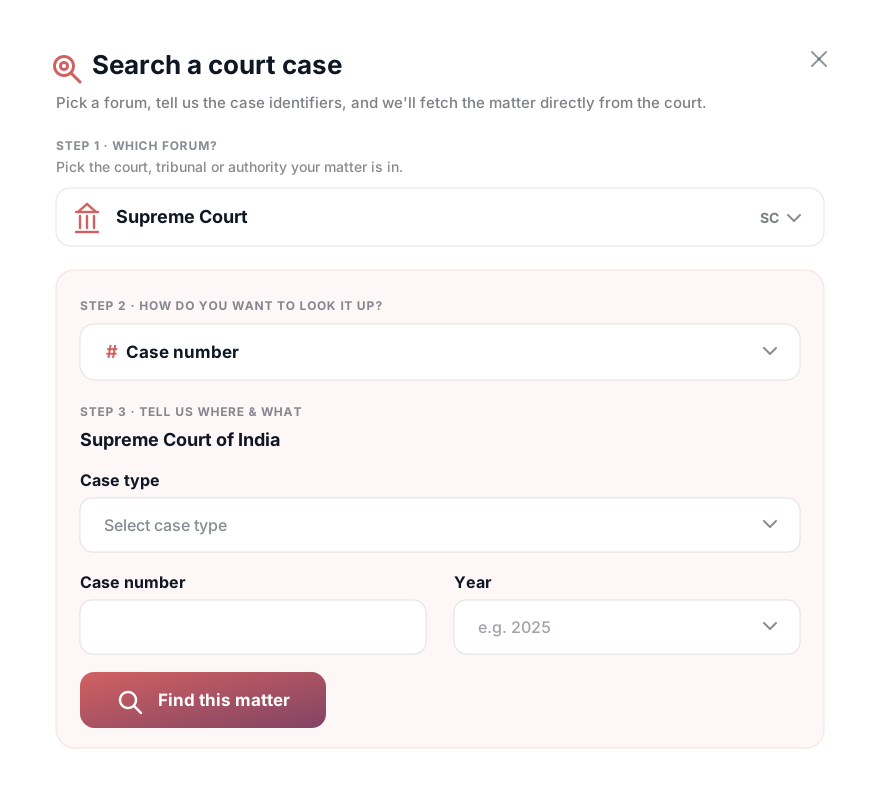
Step 1 - Select your court
In 'Which forum?', pick the court, tribunal, or authority your matter is in. It can be any court in India - the Supreme Court, any High Court, a District Court, a Consumer Commission, RERA, or a tribunal.
Step 2 - Choose how to search
Choose the identifier you have: case number, filing number, party name, or CNR number. Different courts support different identifiers, so the available options adjust to the forum you selected. Then fill in the details - for example the case type, case number, and year - and click 'Find this matter'.
Step 3 - Subscribe and get updates
Once Bharat.Law surfaces the matter, subscribe to it. This adds the case to your workspace and switches on live monitoring against the court's cause lists and orders. From then on, you receive notifications whenever there is any update - a new listing, a fresh order, or a changed hearing date. No more morning portal checks; the matter comes to you.
For Teams and Enterprises: Assign and Share Matters
Tracking is more valuable when a whole chamber or legal department works from the same view. On Teams and Enterprise accounts, every tracked matter can be assigned to specific team members and added to your organisation's workspace. A partner can assign a High Court matter to the junior handling it; an in-house head can route a consumer dispute to the right counsel; and everyone sees the same live status, orders, and documents. Because court tracking lives inside the shared Case Workspace, a listing does not trigger a scramble - the assigned associate already has the case file, the prior research, and the document bundle in one place. The response to 'we're listed tomorrow' becomes a two-minute review, not a forty-five-minute reconstruction across portals, spreadsheets, and chat threads.